
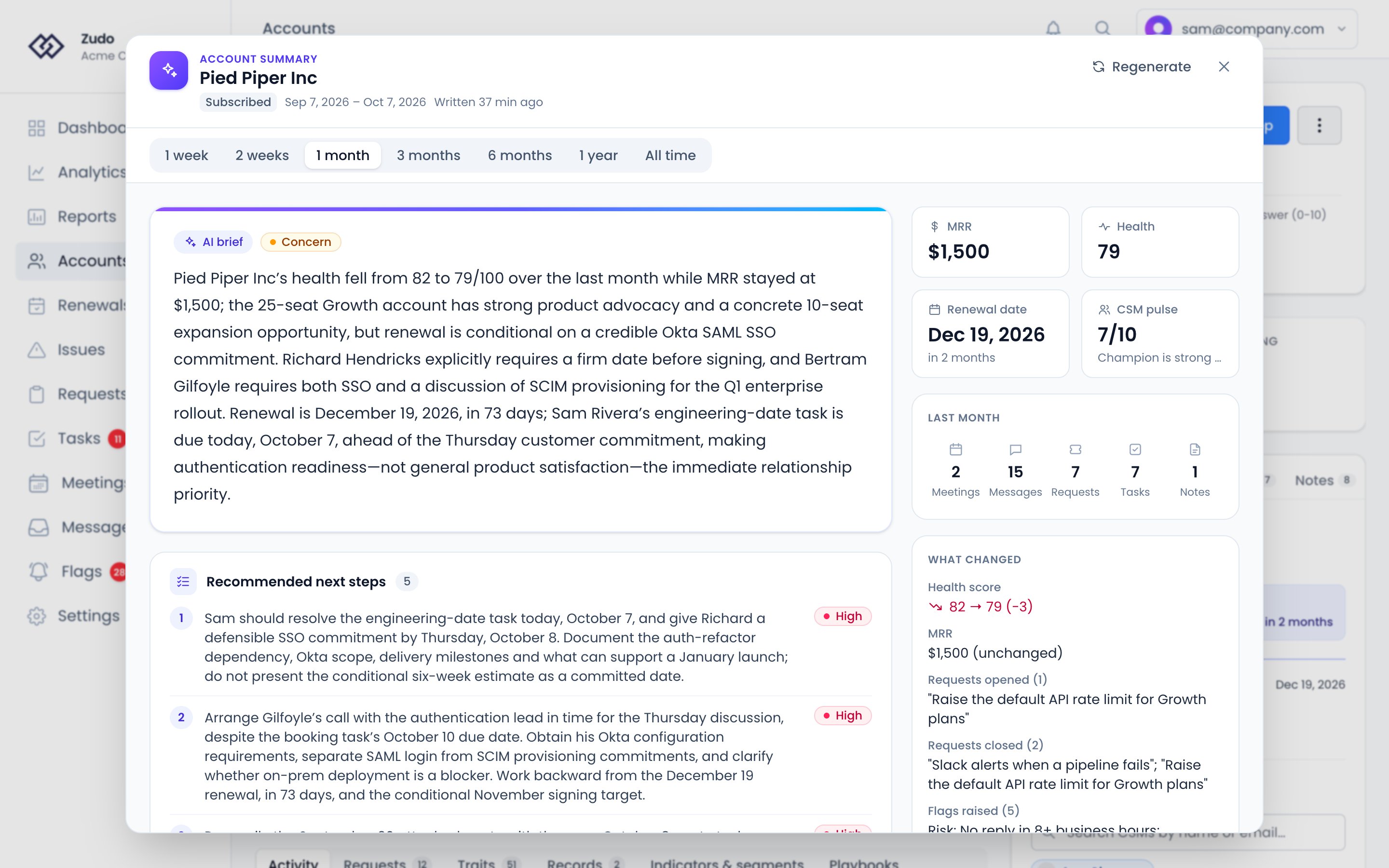
Generating a summary
1
Open the account
Navigate to the account you want to summarize.
2
Open Account Summary
Open the ⋮ menu in the account header and choose Account Summary.
3
Choose a time range
Select how far back you want the summary to cover, from the bar under the title. If there’s no summary for that
range yet, click Write the summary.
4
Review
The AI analyzes activity within your chosen range and returns a structured overview.
What’s in a summary
The AI’s read on the account comes first, marked Healthy, Stable, Concern or At risk. Under it:- Recommended next steps, numbered, each marked high, medium or low priority
- Risk factors, each with its severity, beside the highlights of the range. An urgent highlight is shown in red
- Activity: what the conversations, meetings, requests and tasks in the range amounted to
Time ranges
What it reads
Every message says whether your team or the customer wrote it, from the message itself rather than the sender’s email domain, so a Slack message with no email address is still attributed. The activity counts beside the summary are what the range held, not only what it read. Dates are in your own timezone.
For a parent account, it reads every account inside it.