
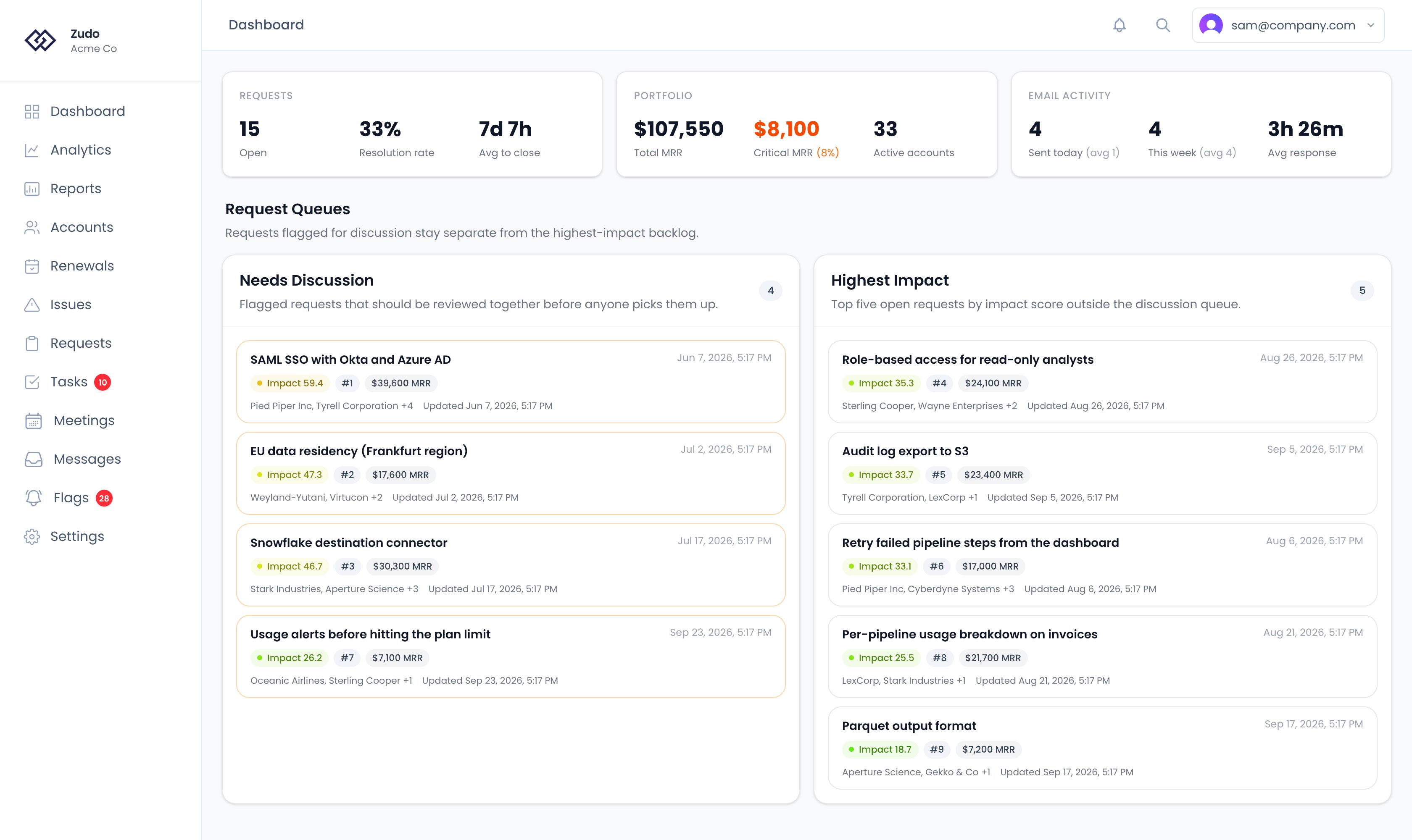
Stat cards
Requests
Portfolio
Email Activity
Only shown if your organization has synced email data.
“Internal emails” means messages sent from your organization’s configured email domains.
How “Avg response” is calculated
For each email thread we walk messages in order. When a customer message arrives, we start a “turn” and wait for the next reply from one of your email domains. That reply closes the turn and produces one data point — the wait time is measured from the first customer message in the turn, so follow-up emails from the same customer don’t multiply the count. We then average across every turn closed in the last 90 days. The wait time is counted in business hours only:- Time outside your configured business hours doesn’t add to the wait. A reply at 7pm to a 3pm email is recorded as the same wait time as one at 5pm.
- Weekends and disabled days are skipped entirely. A weekend customer email starts the clock at the beginning of the next business day.
- If your organization hasn’t configured business hours yet, we fall back to the Time zone on your profile and a default Mon–Fri 8:30–5:00 schedule.
Request queues
Below the stat cards the dashboard shows two queues side by side. Both are scoped to open requests (status not Done, Closed, or Completed) and refreshed automatically — the dashboard has no manual filters.Needs Discussion
Every open request flagged as Needs Discussion, sorted by backlog rank (lowest first), with severity and recency as tiebreakers. There’s no cap — all flagged requests appear here so nothing gets buried while it waits for a team review.Highest Impact
The top 5 open requests not flagged for discussion, sorted by impact score (highest first), with backlog rank and recency as tiebreakers. This is your “what should I work on next” list once the discussion items are cleared.Row contents
Each row in either queue shows:- Title and requested date
- Impact badge — color-coded (green at low, red at high) with the numeric score
- Backlog rank —
#Nfrom the current open backlog, or “Pending rank” if not yet ranked - MRR badge — total MRR from linked accounts
- Account summary — first two account names, plus a
+Noverflow count - Linked issues count — e.g. “3 linked issues”
- Updated timestamp