
Accounts list
The main Accounts page shows all your accounts in a sortable, filterable table. Each row shows the account name, MRR, health score with a trend sparkline, status, CSM, last meeting date, last email date, last active date, and open request count.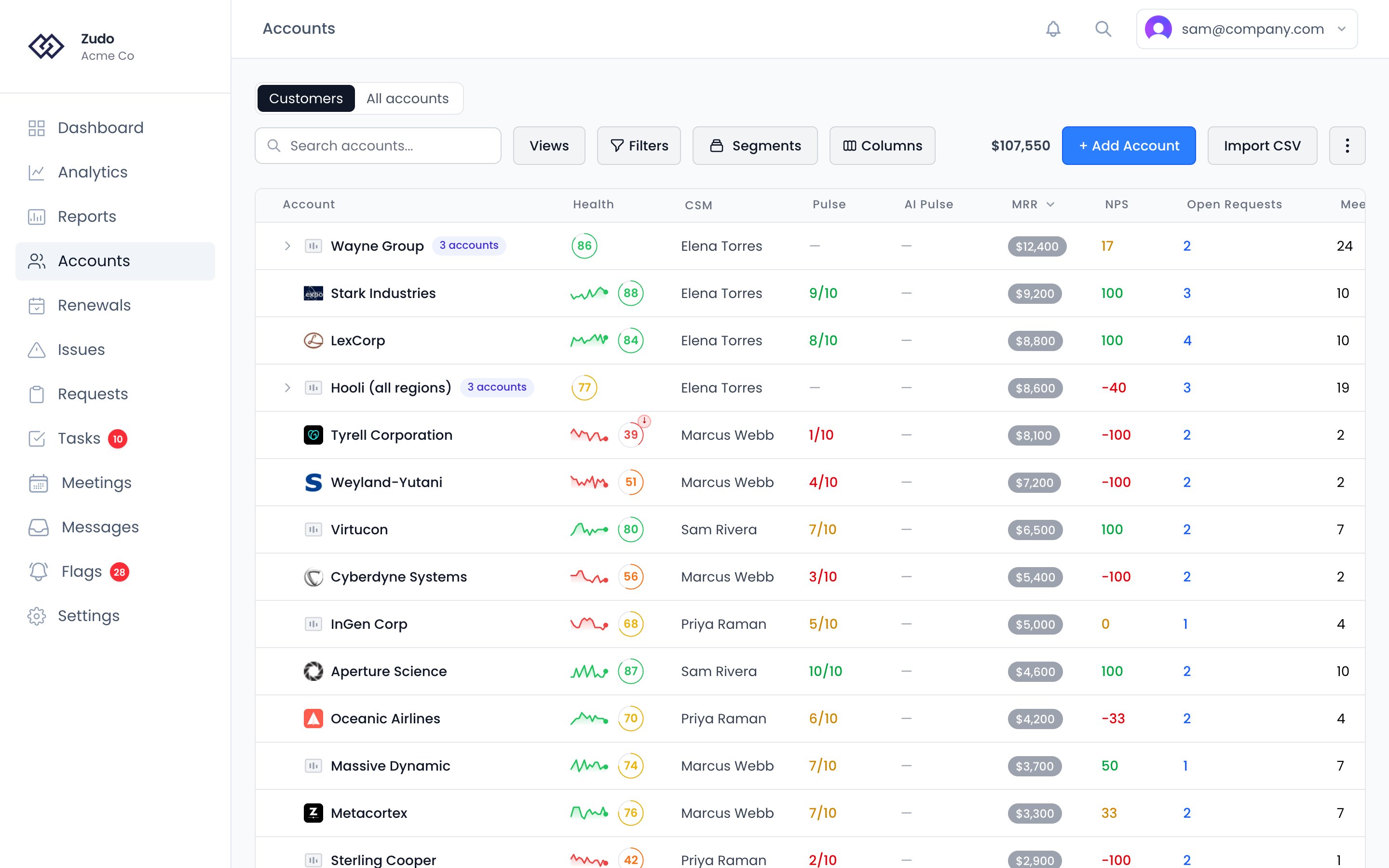
Filtering the table
Open Filters to narrow the list. Everything on an account can be filtered on: its own fields (name, status, MRR, health score, pulse scores, created date), the activity counted on it (open requests, meetings, emails, contacts, notes, and when each last happened), every trait it carries, and every indicator computed for it. Filters combine — each one narrows what the last one left. The Zudo group, in both Filters and the column picker, holds the Zudo traits the table doesn’t already have a column for: Renewal Date and Days Until Renewal, Health Tier, Trial End Date, Churned Date, Last Active, Last Product Activity, ARR, Parent Account and the request stages. So “renewing in the next 30 days” is a filter on Renewal Date, and the date can be a column. The Renewals page offers the ones it doesn’t show already the same way. Every trait in Filters, the column picker and the rule builders has a small mark beside its name showing where its value comes from: the connection’s logo for a synced trait or one your product sends, Zudo’s mark for a Zudo trait, a pencil for a custom trait your team fills in, and fx for a smart trait. Hover it to see the source in words, such as “Synced from Stripe”. Two traits can share a name, a Plan from HubSpot and another from Stripe, and the mark is how you tell them apart. Where two connections sync the very same trait, the mark shows the one your trait name precedence ranks first, which is the value the column and the filter read. Each filter offers the operators that suit its type, and they are the same operators segment conditions use. Numbers take ranges and comparisons, text takes contains and starts with, dates take both relative windows (“within the last 30 days”, “more than 90 days ago”) and fixed ones (“between” two dates), and every type can ask whether the value is set or is not set at all. Most also have a does not equal or does not contain for asking the question the other way round. Some filters have presets, which are the common answers written out: Healthy (80+), At Risk (40-59), Has open requests, Last 30 days. CSM → Me gives you your own book; CSM → Nobody lists the accounts no one has been assigned to, which is the fastest way to find gaps after changing your assignment rules. Filters are remembered per browser, so the list you left is the list you come back to. Save a set of them with Saved views to switch between them or share them with your team. Switch between Customers (one row per customer) and All accounts at the top of the list. See Parent accounts for grouping the accounts that make up one customer. From the ⋮ menu at the top right of the Accounts page, you can also open Daily Follow-Up to see a ranked daily sweep grouped by why you should work with each account today — accounts you owe something, accounts with news to share, or strategic accounts that need a proactive touch. This opens a modal with lane counts, AI-written summaries, and recommended next steps.Account detail page
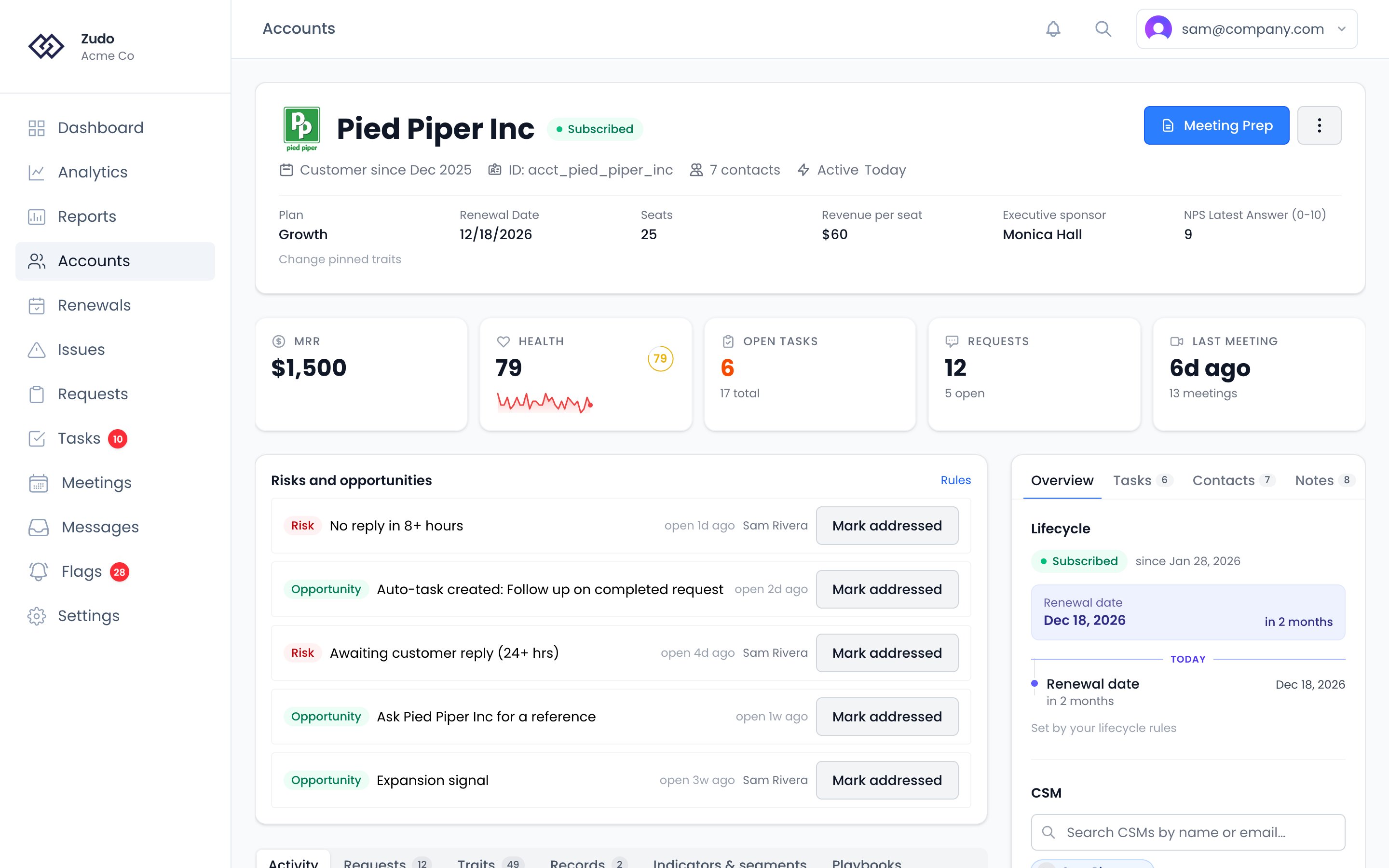
The account page has three parts. The header carries the account’s name, status and quick facts, the Meeting Prep button and the actions menu. Below them are your organization’s pinned traits, and under the header a row of figures: MRR, health, open tasks, requests and the last meeting. The main column starts with Risks and opportunities, the account’s open flags, then a row of tabs:- Activity — a chronological feed of everything that’s happened: emails, meetings, tasks, notes, files and product events. Use it to catch up before a call or work out why a score changed.
- Requests — the customer requests linked to this account, and Add Request.
- Traits — every trait on the account, in a section for each place it comes from: Zudo (what Zudo knows itself, such as MRR, lifecycle status, renewal date and last active), Custom traits your team maintains, computed smart traits, then one section per connected platform and per product source such as Segment or PostHog. Click a section’s heading to collapse it. Which sections you keep collapsed is remembered for you, on every account and any device, and doesn’t change what anyone else sees. Searching shows matches in every section, collapsed or not.
- Records — the account’s custom object records. Click one to open it.
- Indicators & segments — the account’s current indicator values, which segments it’s in, and its NPS answers.
- Playbooks — the playbooks running on this account now, and the ones that ran on it before.
- Overview — the account’s lifecycle and its key dates, the CSM, what makes up the health score, CSM Pulse, AI Pulse, recent meetings and account details.
- Tasks — open and completed tasks linked to this account. Create new tasks directly from here.
- Contacts — people at the account. Add them by hand or let them arrive through email and meeting syncs. Each contact shows when they were last active, like “Active 2 days ago”. The account’s own last active date comes from the sources your organization configured under Last active.
- Notes — freeform notes from you and your teammates, timestamped and attributed.
- Files — attachments kept with the account: screenshots, contracts, slide decks.
- Search — search this account’s emails, meetings, notes, requests and issues, or turn on Ask AI to ask a question about the account in plain words.
Pinned traits
Your organization can pin the traits your team checks first, like plan, renewal date or contract owner, so they show in the header of every account. To pin a trait, open the Traits tab on any account and click the pin beside it. Click it again to unpin. Pins belong to your organization, not to you: pinning or unpinning changes every account page for everyone. Only admins and owners can change them. Everyone else sees the pin icon on pinned traits, but can’t click it.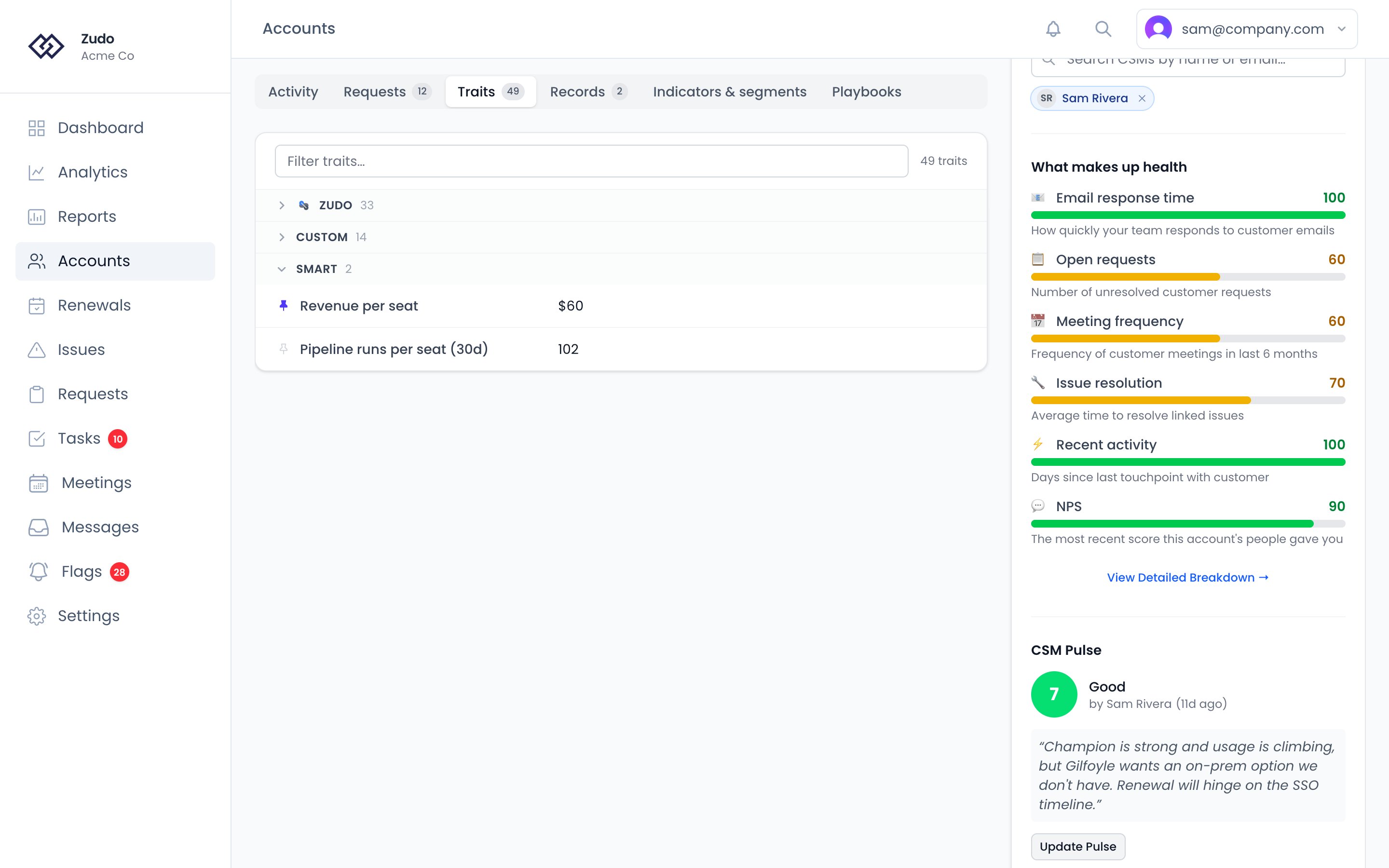
CSM assignment
Each account can have a designated CSM. Set or change it from the CSM picker on the sidebar’s Overview tab. The assigned CSM:- Receives alert and notification emails for the account (unreplied threads, request-done follow-ups, health-tier drops).
- Is the default assignee for auto-created tasks linked to the account.
- Sees the account’s activity in their personal daily and weekly summary emails.
Account status
Every account has a lifecycle status: Trial, Onboarding, Subscribed, Churned or Ignored. Trial, onboarding and subscribed accounts are live and get health scores. Churned and ignored accounts are left out of scoring and hidden from the accounts list unless you filter for them. The Lifecycle panel on the sidebar’s Overview tab shows the status, how long the account has had it, and its key dates, such as when a trial ends or the contract renews. See Account lifecycle for what each status means and how to change one.Custom traits
Custom traits are additional fields your admin defines in Settings → Organization → Traits to capture data specific to your business — things like renewal date, product tier, contract type, or region. Alongside them are Zudo traits: what Zudo itself knows about every account, such as MRR, lifecycle status, the renewal date from your renewal pipeline, health tier and when the account was last active. They need nothing set up and can’t be edited. They’re on the Traits tab, can be pinned, and are offered in rule builders, playbook values and the API. See the full list. Traits appear on the account’s Traits tab, can be pinned to the top of every account, and are available as dimensions and filters in Custom Reporting. If you’ve connected Vitally, you can also sync platform traits and update them automatically with Webhook Actions.Creating an account
Click + Add Account on the Accounts list. Fill in the name and MRR at minimum. MRR is important because it feeds into request impact scoring - even an approximate number is better than leaving it blank. You can also set an initial status and add a primary contact. Once saved, the account starts appearing in your portfolio and will receive a health score after the next nightly calculation.Importing accounts from CSV
Click Import CSV on the Accounts list to bulk-create accounts from a CSV file.- Download the sample template for the expected format.
- Upload your CSV — columns are auto-mapped by header name (supports aliases like “company”, “revenue”, “primary contact”).
- Preview the first 20 rows, then click Import N Accounts.
Account detail actions
Meeting Prep has its own button in the account header, which generates an AI pre-call briefing (see Meeting Prep). Beside it, the ⋮ menu provides quick access to:- Account Summary — generate an AI overview of the account (see Account Summary)
- AI Pulse — let AI suggest a CSM Pulse score (see AI Pulse)
- Log Meeting — create a manual meeting linked to this account (see Meetings)
- Sync from Vitally / HubSpot / Stripe — refresh just this account from one connection, without running a sync across your whole organization (see Syncing one account)
- Status — move the account to Trial, Onboarding, Subscribed, Churned or Ignored (see Account lifecycle)
- Add to parent account / Create parent account — group this account with the other accounts that make up the same customer (see Parent accounts)
- View in Vitally / HubSpot / Stripe — open the account in external tools (when connected)
Syncing one account
Every connection that holds account data can refresh a single account on its own. Open the ⋮ menu on the account detail page and pick Sync from Vitally, Sync from HubSpot or Sync from Stripe. Only that account changes — no other account is touched, and nothing else about the connection runs. This is useful when a figure on one account looks stale and you do not want to wait for the next scheduled sync, or run one across everything. What each connection refreshes:
The menu only lists connections that can actually reach this account. A connection appears when your organization has it enabled; if the account is not linked to a record in that system yet, Zudo tells you rather than failing quietly.
Stripe works slightly differently. Zudo does not store a link between an account and a Stripe customer — it matches
customers to accounts using the strategy set on the connection. So syncing one account asks Stripe which customer
belongs to it, using the same matching rule. If your matching strategy is email and the account has no contact with an
email address, there is nothing to look up, and Zudo says so.
Account logo
Click the account logo on the detail page to upload a custom image. This logo appears throughout the app wherever the account is referenced.Timeline
The activity timeline shows a chronological feed of meetings, emails, tasks, notes, files, NPS answers, and (when connected) product-usage events. Use the filter bar to show only a specific type. You can add items directly from the timeline:- Task — inline form with title, priority, and due date
- Note — markdown note with timestamp and author attribution
- Email — log an email manually
- File — upload an attachment (PDFs open in an in-app viewer)
Events filter
If you’ve connected Segment or PostHog, the Events filter shows recent product-usage events for this account —login, feature_used, whatever your app sends. Above the list, a 30-day daily-counts chart plots the busiest five event names, and its N of M events control lets you switch any other event name in the window on or off. Click an event in the list to expand it and read the properties it carried. The chart counts by UTC day while the list groups by your timezone, which it states under the axis so the two can be lined up.
The list covers every event name on your allowlist, and Load more activity walks further back through it. Events show up here once they’ve matched the account via Identity rules on the connection. If you don’t see events you expect, check Settings → Connections → (your source) → Recent events to confirm what’s arriving.
NPS filter
The NPS filter shows every NPS answer from this account, newest first — the score in its band’s colour, who gave it, and what they wrote. Answers appear in the All view too, in date order with everything else. On a parent account the list carries its members’ answers as well as its own, each one tagged with the account it came from.Indicators panel
The Indicators & segments tab shows every Indicator configured for your org with the account’s current value:- Yes / no indicators — green chip with ✓ when true, gray with ✗ when false, yellow when not yet computed
- Number indicators — labeled badge with the current numeric value
Segments
Use Segments to create saved filter groups that define account subsets — by MRR range, health score, traits, activity counts, or any combination of conditions.Contacts
The contacts tab shows people at the account. Contacts populate automatically through email and meeting syncs, or you can add them manually. Click the copy icon next to any contact’s email to copy it to clipboard.Health Scoring
How the 0–100 score is calculated and what each factor measures.
CSM Pulse
Override the automated score with your own assessment when you know something the data doesn’t.
Indicators
Named predicates over product-usage events — power user, active in last 7 days, ever exported.
Segments
Saved filters that define account groups — by MRR, health, traits, indicators, and more.