
- Impact Score: the computed 0-100 score shown in the UI
- Customer Urgency: a request-level default plus optional per-account overrides
- Backlog Rank: where the request sits relative to other open requests in your scope
This page keeps the older
/requests/severity-scoring URL for compatibility. In the product UI, the computed score is
labeled Impact Score.- Impact Score answers “how much business impact does this represent?”
- Customer Urgency preserves the human signal and lets different linked accounts carry different urgency
- Backlog Rank makes the relative order of open requests explicit
Impact Score
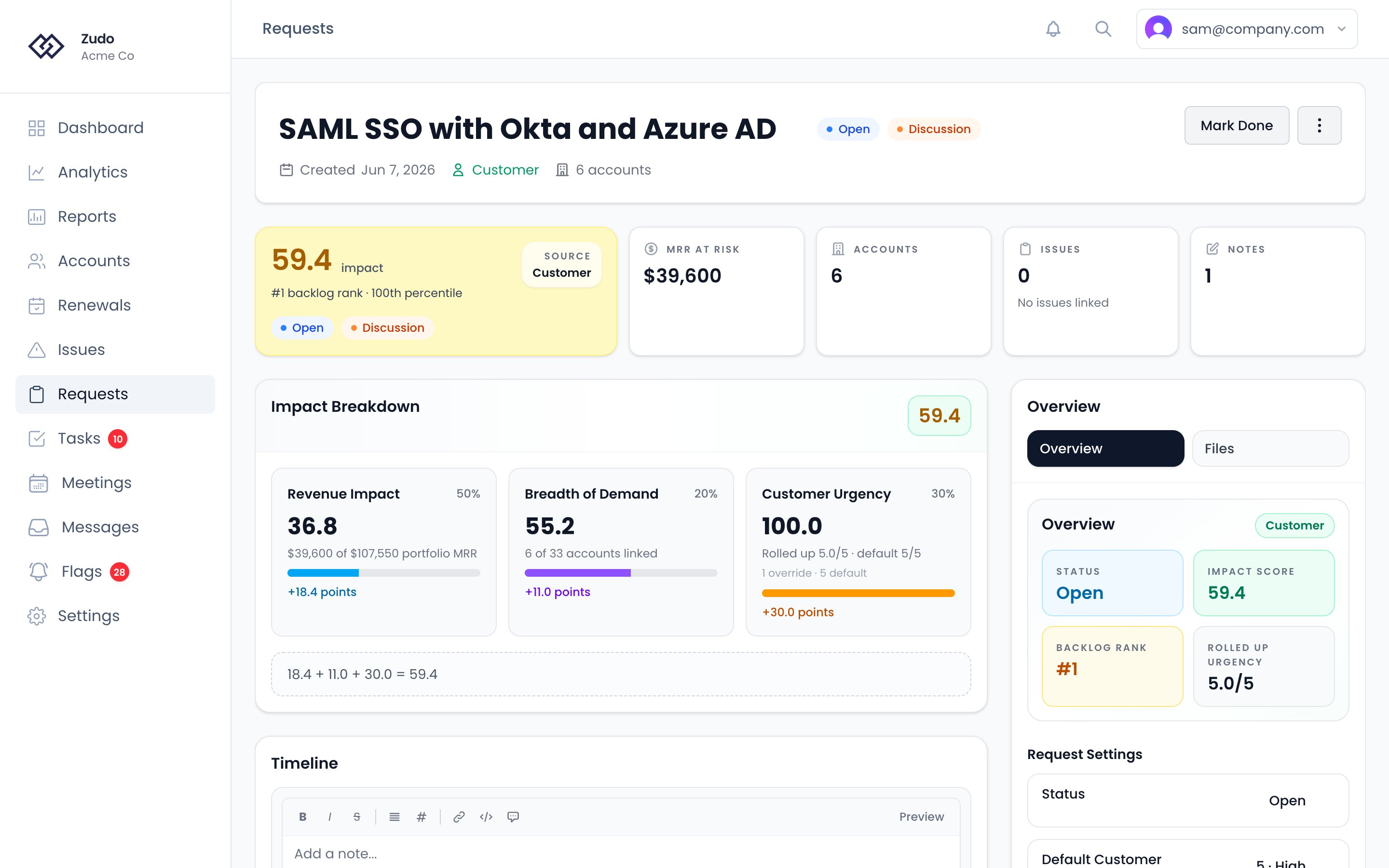
Revenue impact (50%)
What share of your total portfolio MRR is represented by the accounts linked to this request.Breadth of demand (20%)
How much of your portfolio is asking for this request. Zudo uses a log-scaled share of the scoped account base, so the score rewards broad demand without letting raw account count overwhelm revenue.Customer Urgency (30%)
Every request starts with a default 1-5 urgency rating. Each linked account can either inherit that default or override it with its own urgency. Zudo then rolls those account-level urgencies up into the effective request urgency used in scoring. That rolled-up urgency captures context the numbers cannot: churn language, competitive pressure, executive attention, or a workflow blocker.
The default is 3 (Medium). Use it to reflect how urgently the customer needs this:
- 1 - Nice-to-have, no urgency expressed
- 2 - Mentioned but not blocking anything
- 3 - Customer wants this and follows up occasionally
- 4 - Blocking a workflow or expansion; customer is escalating
- 5 - Churn risk, active competitive threat, or the customer is completely blocked
How rollup works
The effective urgency used in the formula is not a plain average.- each linked account gets either its override or the request default
- larger accounts matter more, but with damping so one whale does not fully dominate
- the highest-urgency linked account still matters even if the average is lower
- Breadth already measures how many accounts care
- Revenue impact already measures how much business weight is attached
- Urgency should measure intensity of need
No linked accounts
If a request has no linked accounts, revenue impact and breadth are both zero. Only the weighted urgency contribution remains, so the request tops out at 30.0 until you link real customer demand. In that case, Zudo falls back to the request default urgency because there are no account-level values to roll up.
This keeps early ideas visible without letting unlinked requests outrank proven customer demand.
Backlog Rank
Impact Score is an absolute measure. Backlog Rank is the relative order among open requests in your current scope. Zudo ranks open requests by:- Higher Impact Score first
- Earlier requested date first
- Lower request ID first
100th percentile and the last open request is the 0th percentile.