
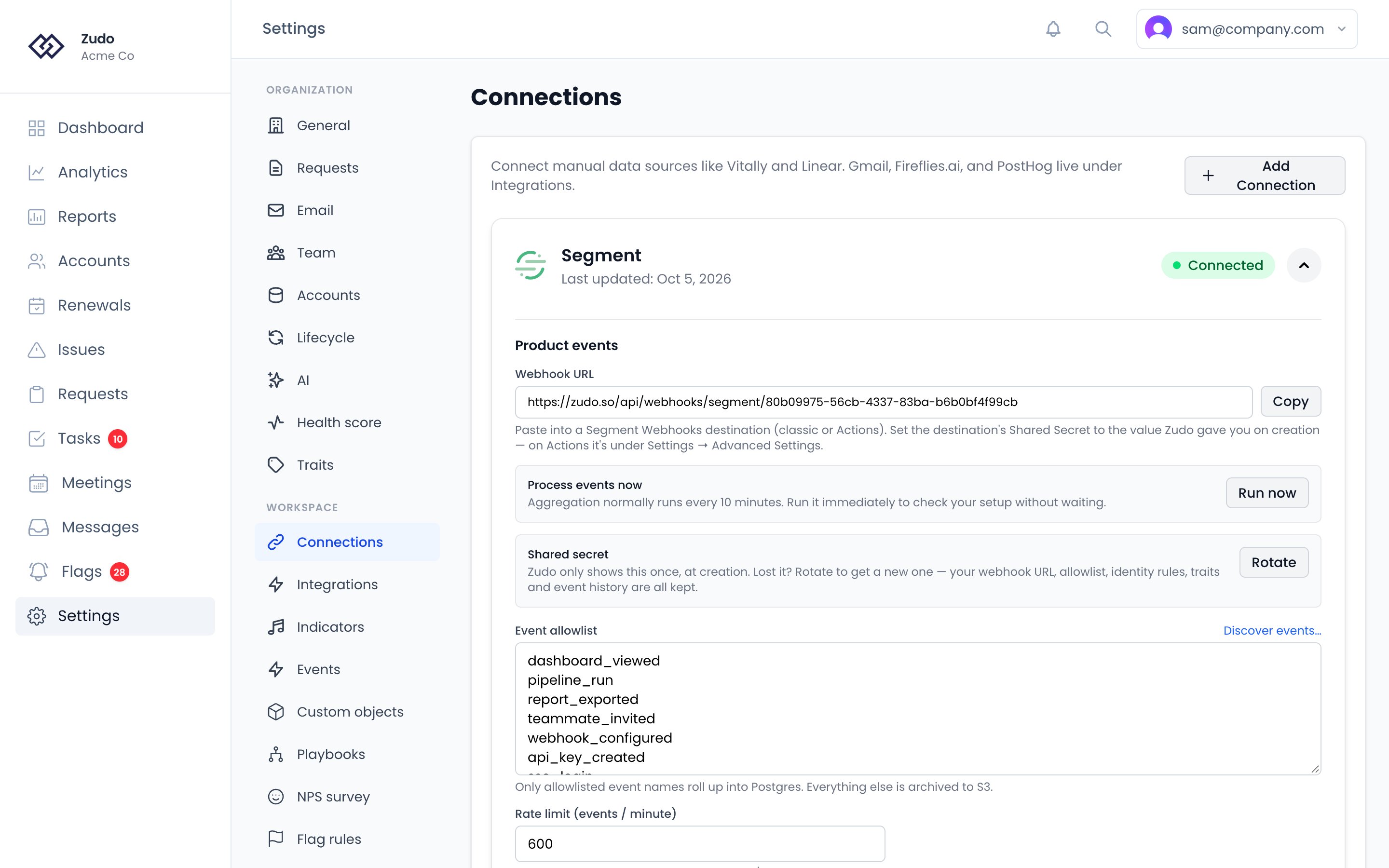
This integration is org-level. Connections are scoped to your organization and managed by an owner. If you
don’t see Add Connection, ask your org owner to set this up.
Before you start
You’ll need:- An owner role in your Zudo organization
- A Segment workspace with at least one source (JavaScript, Node.js, mobile SDK, server-side, etc.) actively sending events
- An idea of which event names matter to your customer-success team — login, feature_used, export_run, billing_renewed, etc. Zudo only rolls up events on an allowlist, so a tight list keeps cost and noise down (you can grow it later from a discovered-events picker — see below).
How it works
groupcalls. Segmenttrackcalls carry auserIdbut nogroupId— the link between a user and their account only ever arrives on a separategroupcall. Zudo remembers those links and uses them to attribute later events. Without them, nothing attributes.- A matching account. The
groupIdyou send has to correspond to a Zudo account, either because you stamped it on one or because you let Zudo create it.
Setup
Five steps. Budget about ten minutes, most of it waiting for the first aggregation run.1
Create the connection in Zudo
Settings → Connections → Add Connection → Segment (product events) → Create Connection.The next screen shows a webhook URL and a shared secret. Copy both now — the secret isn’t shown
again, though you can issue a new one later with Rotate on the connection.
2
Add the Webhooks destination in Segment
In your Segment workspace, open Connections → Destinations → Add Destination and search for
Webhooks. Either the classic Webhooks destination or Webhooks (Actions) works.
- Choose the source your events come from, and name the destination something like Zudo Product Events.
- Paste the Zudo webhook URL into the destination’s URL field.
- Paste the shared secret into the destination’s Shared Secret field. On Webhooks (Actions) that lives under Settings → Advanced Settings.
- Enable the destination.
Batching is safe to turn on. With it enabled Segment signs only the first event of a batch rather than
the whole body, and Zudo verifies that case too.
3
Send group calls from your app
This is the step people skip, and it’s the one that makes attribution work. Wherever a user becomes
associated with a customer account:The id you pass becomes the account’s identifier in Zudo, and
name becomes the account’s name. Call it on
login, or whenever the association changes — once per user per session is plenty.If you’re not sure whether they’re arriving, the Traits & identity graph section of the connection shows
a live count of learned links, and warns you when it’s zero.4
Decide how accounts get created
Your
groupId has to match a Zudo account. Pick one:Let Zudo create them (easiest). Expand Auto-create from events on the connection and enable
Auto-create Accounts, and Auto-create Contacts if you also want the people. Each new groupId
becomes an account named from the group call’s name trait. Leave Minimum events before creating at
1 unless you’re getting drive-by traffic.Or map to accounts you already have. Set each Zudo account’s External ID to the groupId you send
for it. Useful when your accounts came from Vitally or a CSV and you want events to land on those exact
records. If events arrived before you did this, click Reconcile past events to attach them retroactively.5
Allowlist the events you care about
Under Event allowlist, list the
track event names that should roll up — login, feature_used,
export_run. Click Save allowlist (it saves separately from Save settings at the bottom).Don’t have the list handy? Send some traffic first, then click Discover events… to pick from what’s
actually arrived, with counts.You do not need to allowlist
identify or group. Their traits and identity links are always
processed. The allowlist only controls which events become rollup counts and appear on account
timelines — everything is archived to S3 regardless.6
Verify
Trigger an event from your app, then click Run now under Process events now on the connection
card. That runs the aggregation immediately instead of waiting up to 10 minutes for the scheduled one,
and reports what your connection has produced — telling you the next step for anything still at zero.
- Recent events at the bottom of the connection card — events with a resolved Group.
- Traits & identity graph —
user → group linksabove zero. - The account itself — the Events tab shows the timeline, the daily-counts chart, and a Product traits panel.
Settings you can ignore
The connection card has a lot on it. For a standard setup, everything below is already correct:What flows in
Zudo accepts every Segment call type. Allowlisting is what determines which ones become rollup data.
The full payload is preserved on every event in S3 (gzipped JSONL), so you can replay raw archives if you ever change which events you want rolled up.
Single events vs. batched deliveries
Zudo accepts either shape transparently. If Segment sends a batch wrapper ({ batch: [...] }), Zudo expands it into individual staging rows. No configuration needed.
The per-org rate limit is charged per event, not per delivery — a batch of 100 events costs 100 against the
limit. Batching still helps (fewer connections, fewer signatures to verify), but it doesn’t buy you extra
headroom. If you do hit the limit, Segment retries with exponential backoff so events aren’t lost in a
transient spike.
The whole batch is accepted or rejected together. Segment retries a
429 with backoff, so a rejected batch is delayed
rather than lost — accepting it partially would leave Segment no way to know which events to resend.Identity rules
When an event arrives, Zudo runs an ordered chain of strategies to figure out which Zudo Account (and optionally Contact) the event belongs to. The first match wins. The default chain looks like this:- Account chain:
- Match
groupIdagainstAccount.externalId(the canonical external identifier you stamp on accounts in Zudo) - Match
groupIdagainstAccount.vitallyId(if you also have Vitally connected)
- Match
- Contact chain (used when no account match was found):
- Match
userIdagainstContact.productExternalUserId - Match
emailagainstContact.email, regardless of capitalization
- Match
null accountId. Once you populate the right externalId on the account, click Reconcile past events on the connection card to back-fill historic rollups retroactively.
Customize the chain
In the connection’s Identity rules section you can:- Reorder strategies with ↑ / ↓
- Remove strategies you don’t use with ✕
- Add strategies sourced from arbitrary positions in the event payload (e.g.
from: payload:properties.account_uuidto match an arbitrary path) - Match against a custom trait value — useful when your account id is stored as a Vitally trait or a Zudo user-defined trait
Auto-creating accounts and contacts
By default, Zudo only attaches inbound events to accounts and contacts that already exist (manually created, imported, synced from Vitally, etc.). If you’d like Zudo to create the account or contact when an event references one it doesn’t know about yet, you can enable auto-creation. Two switches gate this:- Per-connection toggle — on the Segment connection card under Auto-create from events. The on/off plus naming defaults.
- Predicate rules — on the connection card, under Filter which events qualify. Optional payload + identity rule sets that decide which events qualify.
Connection-level setup
On the Segment connection card, expand Auto-create from events and enable either or both:- Auto-create Contacts — fires when an event has an
emailoruserIdthat doesn’t match any existing contact. Optional payload path for the contact’s name (e.g.traits.name); falls back to the email’s local part. - Auto-create Accounts — fires when an event has a
groupIdthat doesn’t match any existing account. Optional Minimum events before creating threshold (default 1, common values 5–10) that filters drive-by visitors. Optional payload path for the account name (e.g.context.groupTraits.name); falls back toAccount <groupId>.
Auto-created records are tagged with
source: "product_event" so you can filter or audit them later. If you
over-create by accident, you can bulk-delete by source.Filter which events qualify
On the connection card, expand Filter which events qualify to add predicate rules that further restrict which events trigger creation. There are two predicate sets per record type:- Payload conditions — match against fields in the event payload (e.g.
properties.tier == "paid",context.environment != "test"). - Identity conditions — match against the resolved identifiers (
email,userId,groupId) and anypayload.*path.
- Block freemail signups from auto-creating accounts: Identity rule
email not_contains @gmail.com(and similar). - Only create from production events: Payload rule
context.environment == production. - Only create paid customers as accounts: Payload rule
properties.plan != trial. - Block test groups: Identity rule
groupId not_starts_with test_.
≥, >, ≤, <, is set, is not set, is true, is false.
Discovering payload paths
Every auto-create rule and naming-path field asks for a dot-path into the event JSON. The Browse recent payloads panel inside the Auto-create section saves you from guessing:- Click Browse recent payloads → Show.
- Zudo shows 5 recent events from your connection with every available dot-path and its sample value.
- Click a rule or name field to focus it, then click any path in the browser — it gets inserted into that input. With nothing focused, the click copies the path to your clipboard.
How creation works
When an inbound event doesn’t match an existing record, Zudo’s aggregation job (running every 10 minutes):- Checks the connection’s auto-create toggles.
- Evaluates the org-level payload + identity rules. Both must pass.
- For accounts: confirms the minimum events threshold has been met for that group’s
groupId. - Creates the record with
source: "product_event"and the resolvedexternalId(for accounts) oremail/productExternalUserId(for contacts). - Subsequent events for the same group/contact resolve normally via the identity chain — no further auto-creation needed.
What auto-creation does NOT do
- It doesn’t merge existing duplicate accounts/contacts.
- It doesn’t enrich created records with data from third-party services.
- It doesn’t backfill historic events that were already aggregated. To attach those to a newly-created account, use Reconcile past events below.
Hiding events from account timelines
Some events are load-bearing internally but noise for CSMs — Segment’sidentify and group calls are the obvious examples. You want them flowing for identity resolution and auto-create, but you don’t want CSMs scrolling past dozens of $identify rows on every account.
On the connection card, expand Hide events from account timelines and list the event name patterns to hide. Matching events are:
- ✅ Still ingested
- ✅ Still archived to S3 (replayable later)
- ✅ Still rolled up into Postgres
- ✅ Still used for identity resolution and auto-create
- ❌ Hidden from the account Events tab and the daily-counts chart
* wildcards. A common starting set for Segment customers:
Reconciling historic events
If you stampedAccount.externalId on accounts after events had already arrived, those events landed in rollups with accountId: null (no resolution at aggregation time). To stitch them retroactively:
- Go to Settings → Connections and expand the Segment connection.
- Click Reconcile past events at the bottom-left of the settings panel.
- Zudo runs an UPDATE that links every null-account rollup whose
groupIdnow matches anAccount.externalId. A toast shows the count of rows reconciled.
Volume and cost controls
The rate limit field on the connection card caps how many events per minute Zudo will accept from your org. Default is 5,000/min. A batched delivery is charged its event count, so a batch of 100 spends 100 — the limit reflects the rows created, not the number of HTTP requests. Over-limit deliveries return429; Segment retries with backoff.
The event allowlist is the biggest cost lever — only allowlisted event names enter Postgres. Everything else is archived to S3 but never queried by accounts/indicators/health scores.
Troubleshooting
1
Events arrive, but nothing lands on an account
By far the most common cause: no
group calls. Open Traits & identity graph on the connection — if
user → group links is 0, your source isn’t sending them, and Zudo has no way to know which account a
track event belongs to. Add analytics.group(...) per step 3 and events start attributing within
one aggregation cycle.Already sending them? Then the groupId doesn’t match an account. See Events showing on the wrong
account below.2
Events not arriving at all
Open your Segment destination’s Event Delivery tab.
- 401 — the shared secret doesn’t match. Click Rotate on the Zudo connection to issue a new one and paste it into Segment. (On Webhooks (Actions) the field is under Settings → Advanced Settings.)
- 404 — the URL is wrong. Copy it again from the connection card.
- 429 — you’re over the rate limit; see below.
- Nothing at all — the destination is disabled, or attached to a different source than the one your app sends to.
3
Events arriving but no rollups
Check Recent events on the Zudo connection card. If
Allowlist: no for your test events, add them to the
allowlist (Discover events… is the easiest path). Rollups appear after the next aggregation run, which is every 10
minutes.4
Events showing on the wrong account or no account
Identity resolution didn’t match. In Recent events, the
Group column shows the value Segment sent. Make
sure that value equals the target account’s externalId. If it doesn’t, either:- Stamp the right External ID on the Zudo account, then click Reconcile past events, or
- Change what your client sends to
analytics.group(...)so the bound id matches a Zudo account, or - Turn on Auto-create Accounts and let Zudo create one from the
groupIdit’s already receiving.
5
Group calls stopped arriving after a mapping change
On Webhooks (Actions), open the destination’s Mappings tab and look at the trigger on the mapping that
sends
group calls. A User ID condition is the usual culprit: group calls sent from a server or a nightly
batch may carry no userId at all, and a condition on a missing field evaluates to false, so the call is
filtered out silently.In Segment’s Event Delivery tab these show as filtered at destination rather than failed — there’s no
error to find, which is what makes it hard to spot. Make the Group mapping unconditional and keep user
filtering on Track and Identify.6
Sustained 429 responses
Raise the Rate limit on the connection or tighten the allowlist. Note that batching does not help here —
the limit is charged per event, so a batch of 100 spends 100. Reducing the number of events you send (a
tighter allowlist at the Segment end, or fewer high-volume event types) is the effective lever.