
Where to find it
- Open Accounts.
- Open the ⋮ menu at the top right of the page.
- Select Daily Follow-Up.
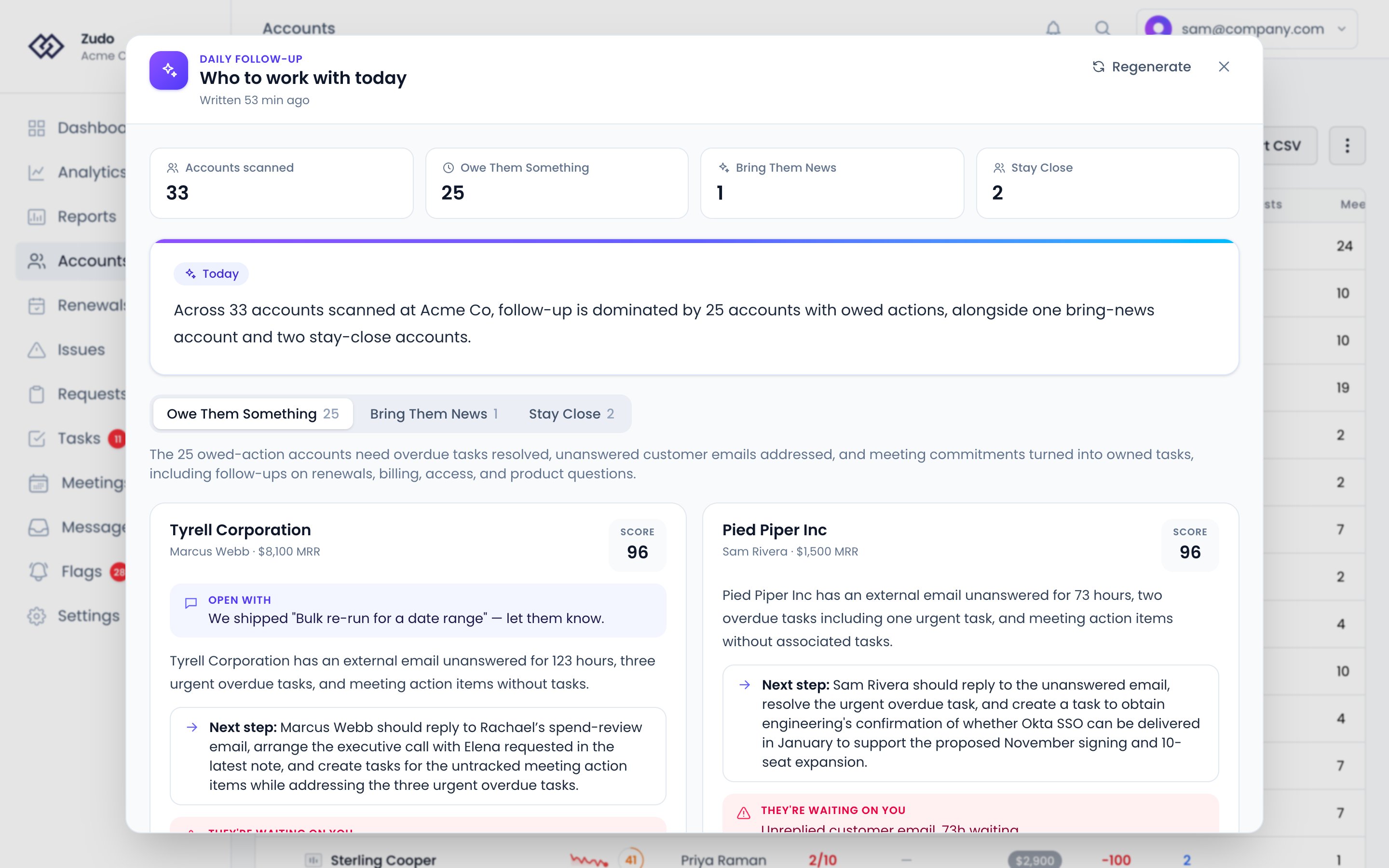
Lanes
An account only appears in Bring Them News if there is real news to bring. Once the customer has been notified — either by completing the auto-created follow-up task for the shipped request, or by sending them an email about it — the signal is suppressed on the next run, and the account drops out of the lane unless another conduit reason exists.
What the UI shows
Each flagged account card includes:- Account name, owner, MRR, segment badge, and an action score
- An Open with line when there is something specific to lead with (e.g. “We shipped X — let them know”)
- A short summary of why the account was flagged
- A Next step recommendation
- A They’re waiting on you callout for accounts in the Owe Them Something lane, listing the specific obligations
- Pulse readouts (health score, CSM pulse and AI Pulse, both out of 10) with a warning when the CSM and AI pulses disagree
- Reason badges grouped by signal type — direct action, conduit, risk trend, and coverage debt
- Last touch age, open request count (with high-impact count), and whether a meeting is booked in the next two weeks
How signals are interpreted
The sweep cross-references multiple data sources before flagging an account:- Shipped requests are checked for follow-through before being flagged. The “let them know” hook is suppressed if either the auto-created follow-up task on the request has been marked done, or your team has written to the customer after the request shipped, by email, Help Scout or Slack — whichever happens first. Who wrote a message is read from the message itself, so a reply in a shared Slack channel counts.
- Discussed requests (internal-only conversations about a request) are similarly suppressed once a note, post-meeting note, outbound email, or completed auto-follow-up task follows the discussion.
- Health score changes compare today’s score with the account’s score a week ago. A tier drop (e.g. healthy → at-risk) escalates while its flag is open and was raised in the last 14 days; once someone marks it addressed, it stops counting.
- Unreplied threads come from the account’s open unreplied flags, on any of its conversations.
- Key dates: a renewal in the next 30 days, or a trial that ends in the next 14, surfaces its account, unless a meeting is already booked in the next two weeks.
- A meeting booked in the next two weeks counts as the account being covered: reasons like no recent touchpoint, a stale meeting cadence or a request waiting on discussion stay quiet. A meeting further out doesn’t.
- Pulse divergence flags accounts where CSM Pulse and AI Pulse disagree sharply, prompting a manual gut-check.
- Touch policies vary by segment (strategic, standard, low-touch, onboarding) so a quiet 14 days on a strategic account is treated differently than on a low-touch one.
- NPS answers from the last 14 days surface their account. A detractor does so on its own, even when nothing else about the account looks wrong — it is the customer saying they would not recommend you, which is stronger evidence than anything the sweep derives from behavior. A promoter lands in the “bring news” lane instead: the moment to ask for the referral or the case study, while it is still true. A passive answer does nothing. Only the newest answer in the window counts, so somebody who scored 2 last week and 10 yesterday is a promoter today.
- Open flags are read as a stated judgement rather than a derived metric. An unaddressed risk surfaces its account even when nothing else about it looks wrong; an unaddressed opportunity contributes without forcing the account up the list. Addressing a flag takes it out of the sweep, because the decision has been made.
Keeping it quiet
Under Daily follow-up on Settings → Organization → Email, an admin can reduce notification noise for the daily follow-up email digest:- Turn the digest email off entirely
- Set Digest sensitivity to Important only, Standard, or Comprehensive
- Limit how many accounts appear in each email section
- Opt out of the digest entirely with the Daily follow-up digest toggle
- Override the org sensitivity setting with the Daily follow-up noise level dropdown