
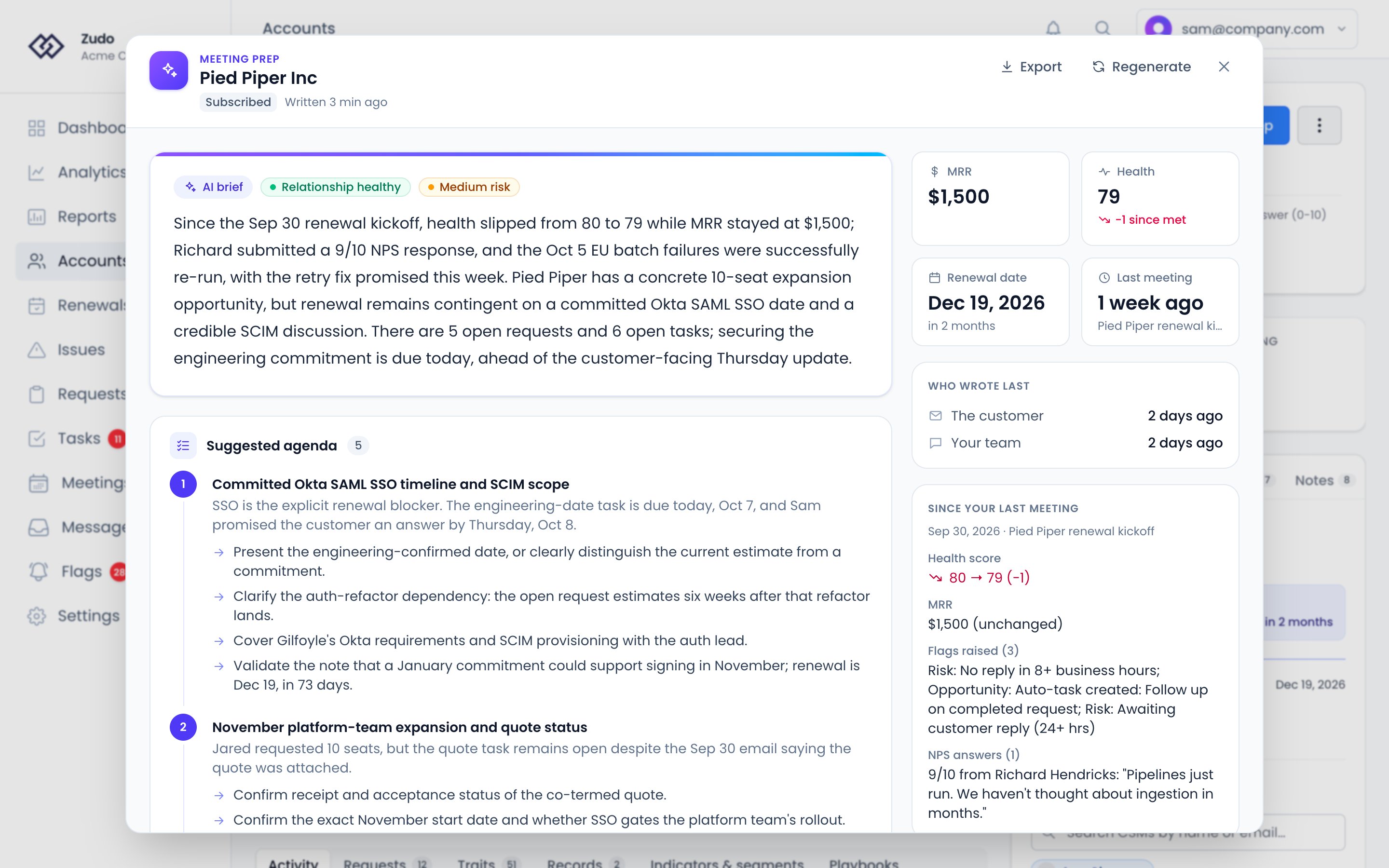
Generating a briefing
1
Open the account
Navigate to the account you’re about to call.
2
Click Meeting Prep
Click the Meeting Prep button on the account detail page. Zudo gathers your data and runs the AI analysis —
typically a few seconds.
3
Review and export
The briefing opens over the account page. Read it top to bottom, then export or copy it before your call.
Briefings are cached for 30 minutes. After that, the button in the bar at the top of the briefing reads Refresh;
click it to regenerate with the latest data. Within the 30 minutes it reads Regenerate, and asks you to confirm.
What’s in the briefing
The briefing leads with what the AI makes of the account, and keeps the facts beside it: in a column on the right on a wide screen, and at the top on a phone. AI brief: two or three sentences on where the account stands and what the call should cover, with badges for the relationship (Strong, Healthy, Neutral, Strained or At-risk) and the overall risk (Low, Medium or High). At a glance: MRR and the health score, each with how it has moved since your last meeting, the date that matters most for the account’s stage, and when you last met. The date is the one the lifecycle panel leads with: a trial end, a churn date or the renewal, with how far away it is. Who wrote last: how long since the customer wrote, and since your team did. When the customer wrote more recently, it says they’re waiting on you. Since your last meeting: what has happened since your last recorded meeting with the account. It shows how the health score and MRR moved, then lists the requests opened and closed, flags raised and cleared, NPS answers, and lifecycle status changes. Only the kinds of change that happened are listed. With no meeting on record it covers the last 30 days, and says so. This section is read straight from your data, not written by the AI. Open items: the account’s active flags, requests and tasks. A flag someone marked addressed or snoozed isn’t listed. A request linked to a Linear issue shows the issue and its state, so you can tell the customer what has shipped or is in review. Overdue tasks are marked. Then the AI’s sections: Suggested agenda: prioritized topics to cover, each with a rationale and talking points. Risks and Opportunities: specific concerns to address and openings to explore. Watch out for: one to three things to be aware of going in, such as sensitivities, past commitments, or a customer waiting on a reply. Questions to ask: three to five account-specific questions to uncover needs, surface blockers or advance the relationship. Relationship: the indicators behind the relationship status, how this customer usually engages, and the state of your recent conversations. Recent meetings: the key takeaways from recent meetings, with any commitments still owed. Recent notes: the latest notes on the account. The AI is told to put each active risk flag among the risks and each opportunity flag among the opportunities. A renewal, trial end or churn date in the next 60 days goes on the suggested agenda. For a parent account, the briefing reads the accounts inside it, and each flag names the account it’s on.Exporting
Click Export at the top of the briefing:Data sources
MRR at your last meeting comes from Zudo’s daily history, which keeps 90 days. When your last meeting was longer ago than that, or before the account’s history began, the briefing shows today’s MRR without a comparison.